Net Meter Problems with Rooftop Solar: Export Not Recording, Wrong Readings and Billing Issues
How bi-directional net meters work, how to read import and export registers, and how to troubleshoot export not recording, unexpectedly high bills, wrong CT polarity, and meter-related inverter faults with your DISCOM.
Net metering is what turns rooftop solar into savings on your electricity bill. A bi-directional meter records energy you import from the grid and energy you export to it, and your DISCOM bills you on the difference (or according to your state's specific net metering or net billing rules). When the meter doesn't record export correctly, or the bill doesn't reflect what your solar is producing, the financial case for your system falls apart.
This guide explains how net meters work, how to read them, the most common problems, and how to resolve them — technically and with your DISCOM.
Quick answer
A net meter has separate registers for imported energy and exported energy, shown on its display as you scroll. If export isn't recording, check that your solar is actually exporting (consumption may be absorbing it), that the meter is the correct bi-directional type and correctly programmed, and that wiring and CTs are correct. Compare the inverter's generation, the meter's export register and your own consumption. Billing disputes are raised with the DISCOM, supported by meter photos and inverter data.
How net metering works
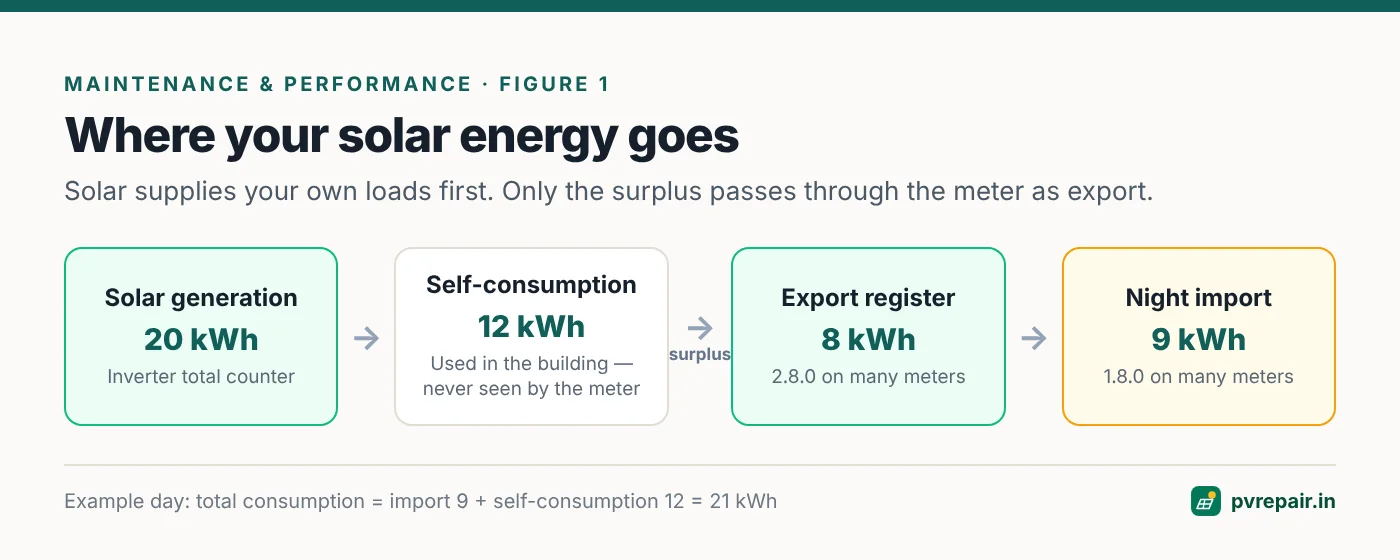
Your solar inverter is connected to your building's electrical system on your side of the meter. When it's producing power:
- Solar power first supplies whatever loads are running in your building.
- If solar exceeds consumption, the surplus flows out through the meter to the grid — export.
- If consumption exceeds solar (or at night), you draw from the grid — import.
The net meter records import and export separately. Your bill is calculated on these registers according to your state's regulations — which may be net metering, net billing or gross metering, with different settlement periods and tariffs.
Generation is not the same as export
A common misunderstanding: if your solar produces 20 kWh in a day and you consume 12 kWh of it directly during the day, only 8 kWh is exported. The other 12 kWh still saves you money, because you didn't import it — but it never appears in the export register.
Reading a net meter
Most net meters in India display a sequence of parameters that cycle automatically or when you press a button. Common ones include:
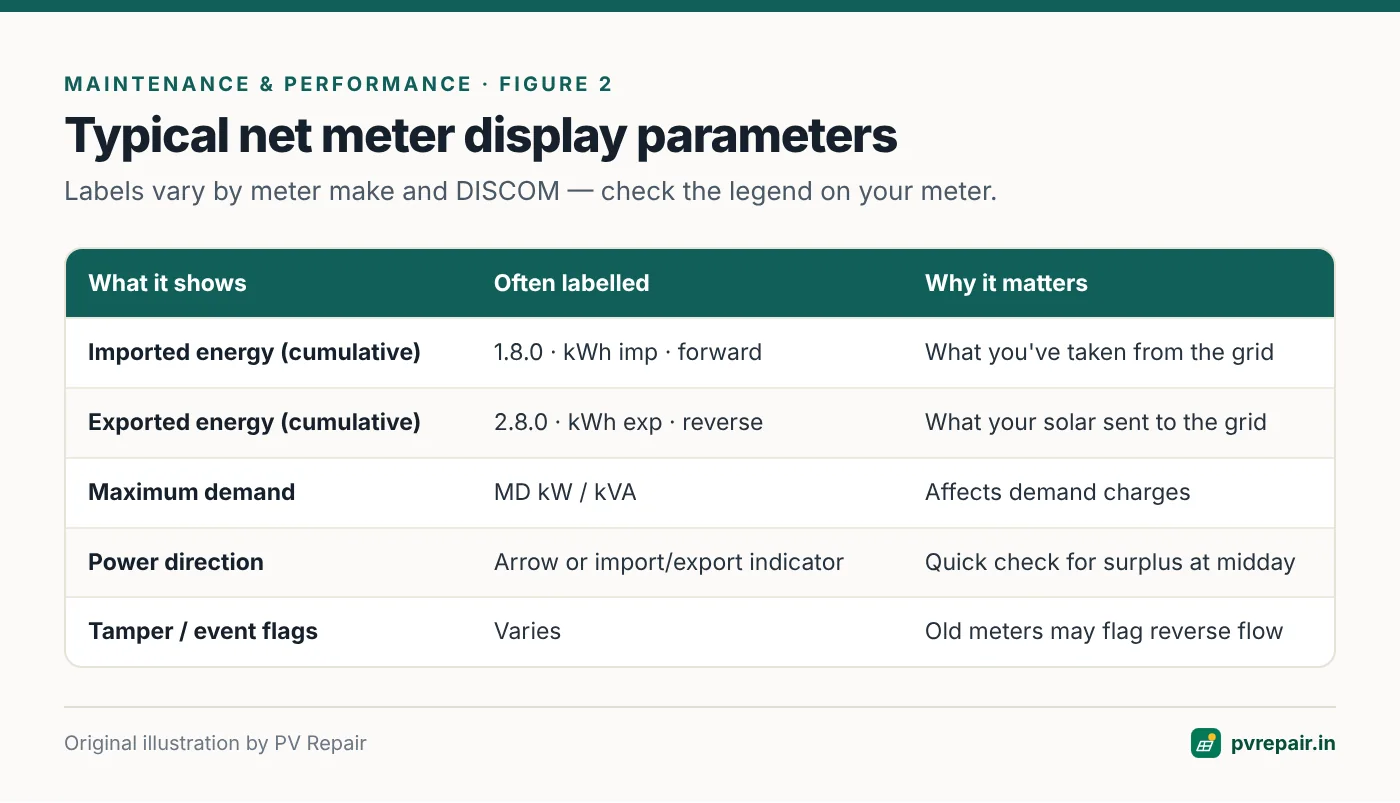
- Import energy (kWh) — often labelled with import/forward indicators or the code 1.8.0.
- Export energy (kWh) — often labelled export/reverse or 2.8.0.
- Maximum demand (kW or kVA).
- Instantaneous power and direction — some meters show an arrow or indicator for import or export.
- Date, time, and tamper indicators.
The numeric codes like 1.8.0 and 2.8.0 come from the OBIS identification system used in many electronic meters. Display labels vary by meter manufacturer and DISCOM, so check the meter's display legend or ask your DISCOM.
A simple reading routine
Photograph the meter display for the import and export registers on the same day each month, along with the inverter's total generation counter. Over a few months, you'll have a clear picture of generation, export and self-consumption — and a solid record if there's ever a dispute.
Self-consumption = Generation − Export
Total consumption = Import + Self-consumption
Net metering, net billing and gross metering
The way your import and export registers turn into a bill depends on your state's regulations and your connection category. The broad models are:
- Net metering: exported units are offset against imported units, usually within a billing cycle, with any surplus carried forward for a defined period and settled according to the state's rules. This is the arrangement most residential rooftop consumers in India have had.
- Net billing (or net feed-in): imported and exported units are valued separately — imports at your retail tariff and exports at a different, often lower, feed-in rate — and the bill reflects the difference in value rather than units.
- Gross metering: all generation is exported and paid at a feed-in tariff, while all consumption is billed separately.
Regulations change, and the rules can differ between residential, commercial and industrial consumers. Read your net metering agreement and your state electricity regulatory commission's current regulations to understand exactly how your credits are calculated. Many apparent "meter problems" turn out to be misunderstandings about settlement rules.
A worked monthly example
A household's records for a 30-day month show: inverter generation 600 kWh, meter export register increased by 260 kWh, meter import register increased by 310 kWh.
- Self-consumption = 600 − 260 = 340 kWh used directly from solar.
- Total consumption = 310 + 340 = 650 kWh.
- Under unit-for-unit net metering, the net billed import would be 310 − 260 = 50 kWh (plus fixed charges), subject to the state's settlement rules.
If the bill instead shows a net import of 310 kWh, the export isn't being credited — a billing or meter programming issue to raise with the DISCOM. If export is close to zero while generation is 600 kWh, either consumption is absorbing all the solar, or the meter isn't recording export at all; the midday surplus test tells you which.
Common problems
1. Export register not increasing
Check first: is there actually a surplus? If your daytime consumption is high, solar may be absorbed entirely within the building. Switch off major loads on a sunny midday and see whether the export indicator or register changes.
If there's clearly a surplus but export doesn't register:
- The meter isn't a bi-directional net meter, or is programmed for import only. This happens when the old meter wasn't replaced, or the replacement wasn't configured.
- Wiring or CT polarity error — for CT-operated meters on larger connections, a reversed CT can cause export to register as import or not at all on that phase.
- The solar connection is on the wrong side of the meter (rare, but seen in some improvised installations).
- An export limit or zero-export setting is active on the inverter.
2. Bill higher than expected
- Import still high because consumption occurs mostly at night when solar isn't available.
- Generation lower than expected — see low generation diagnosis.
- Inverter trips during the day mean less solar used and exported. See grid overvoltage trips.
- Billing calculation: export credits may be settled at a different tariff, carried forward differently, or the bill may not yet reflect net metering if the paperwork isn't complete.
- Fixed charges and demand charges remain regardless of solar.
3. Export recorded as import (meter "running forward" while exporting)
On some older electromechanical or non-net electronic meters, reverse power flow is recorded as consumption, or triggers a tamper flag. This is a serious billing problem; the meter must be replaced with an approved net meter.
4. Meter-related inverter faults
Inverters with export limiting or "zero export" use a separate CT or smart meter on the incoming supply to measure grid flow. If that sensor is wrongly placed, reversed or disconnected, the inverter may limit generation unnecessarily or show Meter Communication Fault / CT Fault. This is a different device from the DISCOM's net meter. See reading fault codes.
5. Three-phase imbalance
With a single-phase inverter on a three-phase connection, solar exports on one phase while you may import on the other two. Depending on whether the meter nets phases together, this can affect what's recorded. Your installer should design phase allocation with your meter type in mind.
Step-by-step troubleshooting
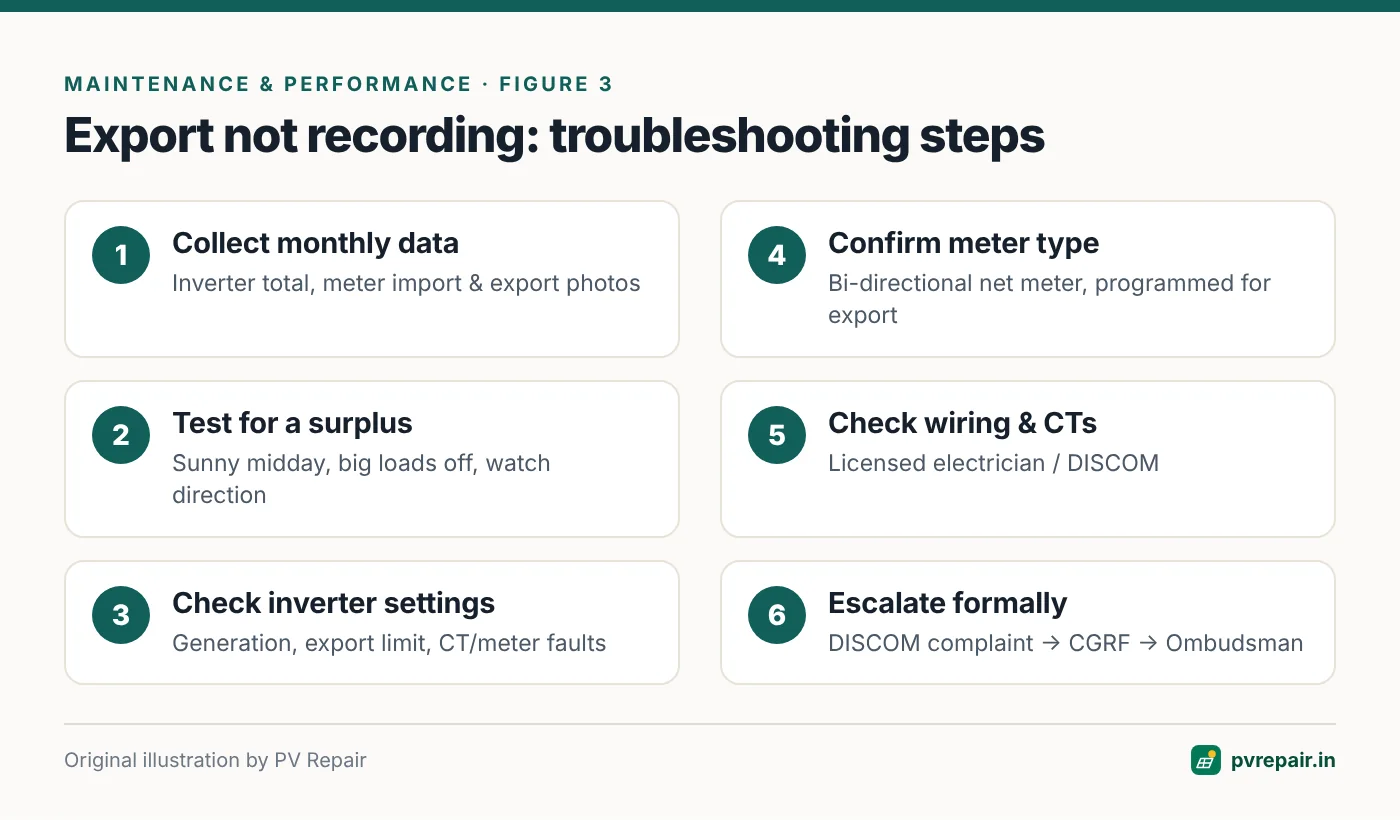
- Collect data: inverter total generation, meter import and export registers (photographed), daily consumption pattern.
- Test for a surplus: at midday on a sunny day, switch off big loads and observe the meter's direction indicator or export register.
- Check the inverter: confirm it's generating, check for export limits, and check any CT/meter fault codes.
- Check meter type and programming: confirm with the DISCOM that a net meter is installed and programmed for export.
- Check wiring: a licensed electrician (and for DISCOM equipment, the DISCOM) can verify CT orientation, phase allocation and connection point.
- Raise it with the DISCOM: if the meter isn't recording export, the DISCOM is responsible for the meter. Provide your data and request testing or replacement.
Working with your DISCOM
- Keep copies of your net metering application, approval, agreement and the meter installation/commissioning report.
- Raise complaints through official channels and keep the complaint reference numbers.
- Provide dated photographs of meter readings and inverter generation data.
- If the issue isn't resolved, consumer grievance redressal mechanisms exist in every state, including the Consumer Grievance Redressal Forum (CGRF) and the Electricity Ombudsman.
Frequently Asked Questions
Why is my net meter not showing export?
Your solar may be used entirely within your building, the meter may not be a programmed net meter, CT or wiring polarity may be wrong, or an export limit may be active. Test for a surplus and check with your DISCOM.
How do I read import and export on my net meter?
Scroll through the meter display. Import and export registers are usually labelled, and may use codes like 1.8.0 (import) and 2.8.0 (export). Check the meter legend or ask your DISCOM.
Why is my electricity bill still high with solar?
Night-time consumption, lower-than-expected generation, inverter trips, fixed and demand charges, or billing settlement rules can all keep bills higher than expected. Compare generation, import and export data to understand where the energy is going.
Who is responsible if the net meter is faulty?
Typically the DISCOM, as the meter is their equipment (or installed under their supervision). Report it formally and keep records.
Does self-consumption count in my savings?
Yes. Every unit of solar you use directly is a unit you don't import, which saves at your import tariff. It just doesn't show up in the export register.
Related guides
Annual Solar PV Maintenance Checklist for Homes and Commercial Rooftops
A complete, practical annual maintenance checklist for rooftop solar in India — visual inspection, modules, structure, DC and AC wiring, inverters, earthing, batteries, monitoring and documentation — with what owners can do and what needs a technician.
Solar System Producing Less Power Than Expected? A 10-Step Diagnosis
How much should your rooftop solar system really generate in India, and how to find out why it's producing less — from weather and soiling to shading, inverter clipping, string faults, degradation and monitoring errors.
Solar Monitoring Offline? Fixing Wi-Fi Dongle, Data Logger and App Problems
Why solar inverter monitoring goes offline — router changes, 2.4 GHz vs 5 GHz Wi-Fi, weak signal, power cuts, server and account issues — and a step-by-step method to reconnect Wi-Fi sticks, Ethernet loggers and 4G dongles.