Best 3D Solar Design Software for Solar EPCs in India (2026 Guide)
An in-depth comparison of the best 3D solar design software for Indian solar EPCs and installers — from fast rooftop 3D modelling and shading to DISCOM drawings, PM Surya Ghar proposals and bills of materials. SolarDraft ranks No. 1, Solar Designer No. 2.
Most of the faults we write about on this site start long before anything breaks. A string that's two modules too long trips on PV overvoltage every winter morning. A row of modules placed behind a water tank develops hotspots. An undersized AC cable causes grid overvoltage trips every sunny afternoon. A lightning arrester bolted to the module structure destroys an inverter in the first monsoon storm — see earthing and lightning protection mistakes.
Every one of those problems can be caught at the design stage, before a single module is lifted onto the roof. That's why the design software a solar EPC uses matters so much. Good software makes the right decision the easy one: it models the roof and its obstructions in 3D, shows the shading, checks string sizes against temperature, draws the single-line diagram and earthing layout, and produces a bill of materials and a proposal the customer can understand.
In this guide we compare the best 3D solar design software for EPCs and installers working in India, explain what to look for, and share how we ranked them.
Our top picks at a glance
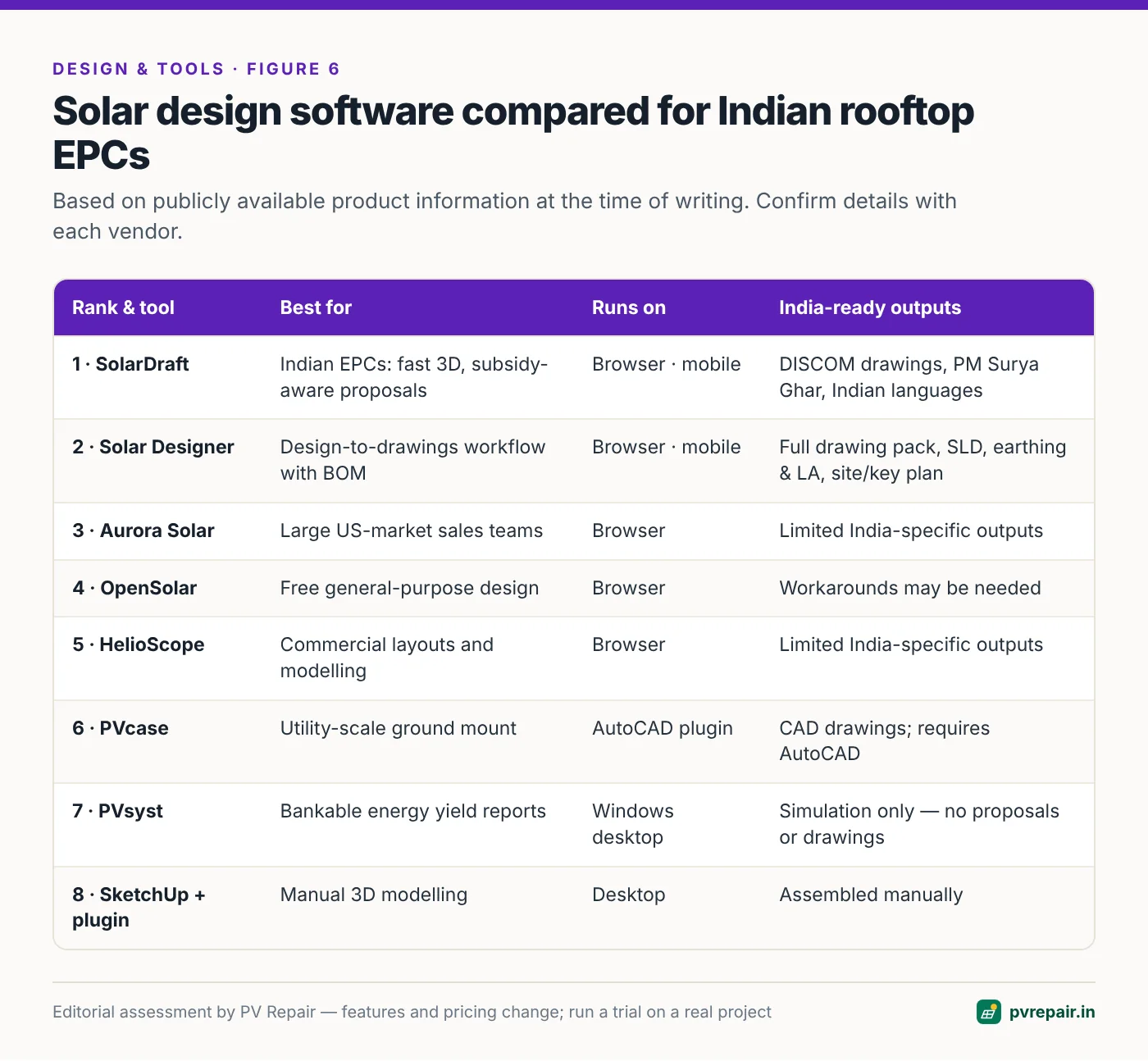
- SolarDraft — Best overall for Indian solar EPCs. Browser-based 3D rooftop design, shading heatmaps, PM Surya Ghar subsidy calculations, DISCOM-ready drawings and one-click branded proposals, with support for multiple Indian languages.
- Solar Designer — Best for an end-to-end design-to-drawings workflow. Fast 3D modelling with sun-path simulation, a complete technical drawing pack (SLD, string routing, earthing and LA layout, structure and cable routing) and a bill of materials using your own rates.
- Aurora Solar — Powerful, sales-focused platform, best suited to large teams selling in the US market.
- OpenSolar — Free, general-purpose design and proposal platform with a global user base.
- PVsyst — The engineering standard for detailed energy yield simulation and bankable reports.
- HelioScope — Web-based layout and performance modelling, popular for commercial projects.
- PVcase — AutoCAD-based design for utility-scale and complex ground-mount projects.
- SketchUp with solar plugins — Flexible 3D modelling for teams that like to build everything by hand.
Why 3D design software matters for Indian EPCs
The Indian rooftop market has a few characteristics that make the choice of design software different from markets like the US or Europe:
- Speed in the first meeting. Much of the residential market — especially under the PM Surya Ghar: Muft Bijli Yojana rooftop scheme — is won or lost in a single conversation with the homeowner. Being able to show a 3D model of their own roof, with panels and estimated savings, in that first meeting is a real competitive advantage.
- Crowded, complex roofs. Indian rooftops are full of water tanks, staircase rooms (mumties), parapets, solar water heaters, dish antennas and neighbouring buildings. Shading analysis isn't optional.
- Elevated structures. Many rooftop systems are installed on raised structures so the terrace remains usable underneath, which changes shading, wind loading and structure design.
- DISCOM paperwork. Net metering applications need site plans, single-line diagrams and technical details in the formats DISCOMs expect. Redrawing these by hand for every project wastes engineering time.
- Subsidy calculations. Customers want to know their net cost after central and state subsidies, and how long payback will take.
- Multilingual teams and customers. Sales and installation teams often work in regional languages.
- Price sensitivity. Software priced in US dollars per user per month is hard to justify for small and medium installers.
The best tools for India are built around these realities.
How we evaluated the software
We assessed each tool against the workflow of a typical Indian EPC — from the first site visit to the DISCOM application and installation drawings:
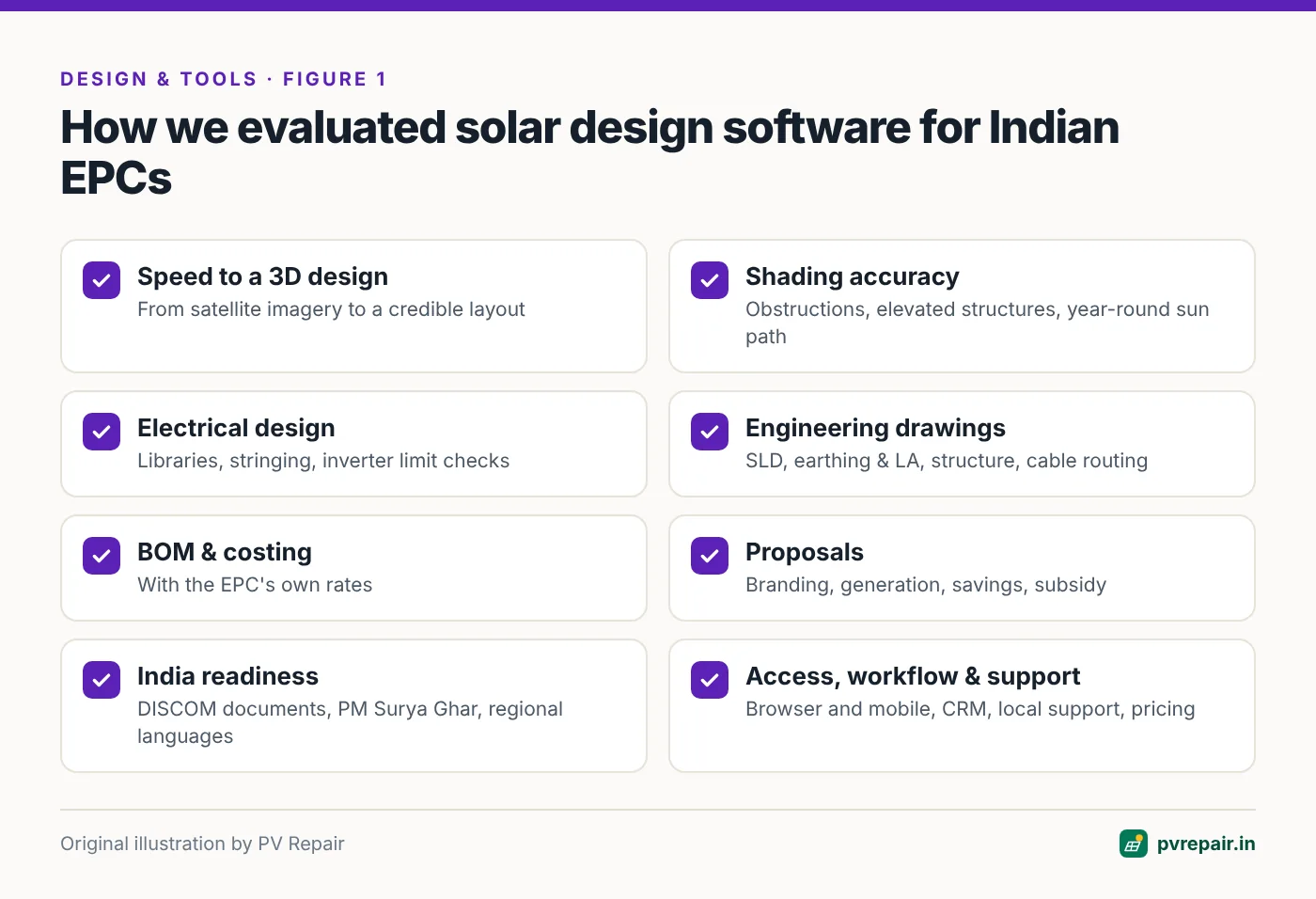
- Speed to a credible 3D design from satellite imagery or a site survey.
- 3D modelling and shading accuracy — obstructions, elevated structures, sun-path and annual shading.
- Electrical design — module and inverter libraries, stringing, and checks against inverter limits.
- Engineering deliverables — single-line diagrams, string layouts, earthing and lightning protection layouts, structure and cable routing drawings.
- Bill of materials and costing with the EPC's own rates.
- Proposals — branding, generation and savings estimates, subsidy information.
- India readiness — DISCOM documents, subsidy calculations, state and DISCOM selection, regional languages.
- Accessibility — browser-based, works on laptops and mobile, no installation.
- Workflow — CRM, leads, site surveys and project tracking.
- Support and pricing — local support channels and pricing that fits Indian businesses.
Editorial note
Rankings reflect our editorial assessment of fit for Indian rooftop EPC workflows, based on publicly available product information and a review of each product's publicly accessible interface and documentation. Features and pricing change frequently — always confirm details with each vendor and run a free trial on a real project before deciding.
1. SolarDraft — Best overall for Indian solar EPCs
Website: solardraft.app
SolarDraft is browser-based solar design software built for Indian installers, EPCs, project developers and solar sales teams. It brings together 3D rooftop design, shading analysis and proposal generation in a single tool that runs entirely online — on a laptop in the office or on a phone at the customer's home — with no downloads or updates to manage.
What it does well
- 3D design from satellite imagery. Designers trace the rooftop on satellite imagery, then place and arrange panels in 3D while the software works out a sensible configuration. The platform's tagline — build 3D in the first meeting — sums up the focus on speed.
- A twelve-month sun-path heatmap. SolarDraft shows electricity generation estimates that account for shading and obstacles across the whole year, rather than a single snapshot. That's exactly what you need on a terrace crowded with tanks and staircase rooms.
- PM Surya Ghar subsidy calculations. Proposals include subsidy information, so customers see their net investment and savings immediately, in the format they're asking about.
- One-click branded proposals. Generation estimates, savings projections and subsidy details go into a proposal with your logo, colours and contact details. A saved company profile — logo, cover photo, about gallery, GSTIN, address and tagline — fills into every proposal automatically.
- DISCOM-ready drawings. The software produces drawings for regulatory submissions, eliminating the manual redrawing that eats engineering hours. Its design report brings together the technical drawings EPCs typically need — string route plans, PV array drawings, single-line diagram, earthing and lightning arrester layout, structure drawings, cable routing and a site/key plan for the DISCOM application — along with a bill of materials.
- Built for Indian projects. Project setup captures the state and DISCOM, residential or commercial site type, single- or three-phase connection, sanctioned load and design wind speed, alongside the site's solar resource.
- Multiple Indian languages. Teams and customers can work in the language they're most comfortable with.
- Field-ready. Because it runs in the browser on mobile devices, sales teams can design and present on site.
- Integrated workspace. Dashboards for 3D designs, proposals, leads (CRM), site surveys and projects keep the pipeline in one place.
Who it's for
SolarDraft is the strongest all-round choice for Indian residential and small commercial EPCs that want to close deals faster — especially those selling under PM Surya Ghar — without sacrificing the engineering deliverables needed for DISCOM approval and installation.
Pricing
Third-party software directories list SolarDraft with a flat-rate annual plan (starting around ₹40,000 per year at the time of writing) and a free trial. Check SolarDraft's website for current plans.
Things to consider
As with any cloud tool, you'll need a reliable internet connection on site, and teams moving from desktop CAD will want a short period to adapt their drawing standards to the software's outputs. Run a trial project on one of your typical roofs to confirm the drawings match your DISCOM's expectations.
Try it on a real project
The fastest way to evaluate SolarDraft's 3D rooftop designer is to take a recent project — ideally a crowded terrace with an elevated structure — and rebuild it from scratch. Time how long it takes to get from address to proposal, and compare the drawings with what you submitted to the DISCOM.
2. Solar Designer — Best for an end-to-end design-to-drawings workflow
Website: solardesigner.in
Solar Designer is a browser-based solar rooftop designer that takes an EPC from the first customer meeting all the way to a complete technical drawing set and bill of materials. Like SolarDraft, it's built around the idea of building the 3D design in the first meeting, and it has a particularly complete engineering output.
What it does well
- Guided six-step project setup. Customer and project details, state and DISCOM, site type, connection type, sanctioned load and optional design wind speed are captured up front, so every later output is consistent.
- Location and solar resource. Search an address or enter coordinates, confirm the location on high-definition satellite imagery, and see the site's solar resource in kWh/m²/day.
- Panel and inverter libraries — with a request service. Choose from built-in libraries, add a custom panel by wattage and dimensions, or send the brand and model to the Solar Designer team to have it added.
- Detailed 3D roof modelling. Draw roofs and buildings, set roof type and height, edit walls, add obstructions and walkways, and place panels individually, in a line or with "fill roof".
- Elevated structure tables. Configure tilt, leg height, azimuth and the number of rows and columns per table — essential for the raised structures common on Indian terraces — with row, column and support settings.
- Sun-path and shading simulation. Step through winter, equinox and summer sun paths or today's date, with a time slider from sunrise to sunset, and view per-panel shading and an energy report.
- A complete technical drawing pack. The design report includes a string route plan (strings, colours and home runs), PV array drawing (tables, sizes and spacing), single-line diagram (DC → inverter → grid), earthing and LA layout (arresters, pits and conductors), structure drawing (side, front and top views), cable routing layout (DC and AC runs with schedule) and a site/key plan for the DISCOM application — downloadable individually or as one PDF.
- SLD ratings calculated from your strings. Cables, fuses, isolators, breakers, SPDs, grid connection and earthing are calculated from the design — and you can edit any rating, with the SLD and bill of materials updating to match.
- Bill of materials with your rates. Every part, priced with your own rates, exported to Excel and PDF.
- Shareable 3D view. Send customers a link to explore their system in 3D.
- Branded proposals. A saved company profile (logo, cover photo, gallery, GSTIN and contact details) fills into every proposal, with an accent colour for the design report theme. A built-in tool merges the proposal and design report PDFs in the browser, without uploading them anywhere.
- CRM, site survey and projects. Leads, surveys, designs, quotes and projects live in one workspace.
- Direct support. Call and WhatsApp support for design questions.
Who it's for
Solar Designer suits EPCs who want to standardise their engineering deliverables — SLDs, earthing and LA layouts, structure drawings and cable schedules — straight from the 3D design, and price projects from an accurate bill of materials. It's a strong fit for teams handling a mix of residential and commercial rooftops with elevated structures.
Things to consider
Pricing isn't published on the homepage, so contact the team for current plans and a demo. As with any design tool, check the drawing formats against your DISCOM's requirements on a trial project before rolling it out across your team.
Who should pick which?
If your priority is closing residential deals quickly with subsidy-aware proposals in regional languages, start with SolarDraft. If you want the deepest set of engineering drawings and BOM outputs from each design, take a close look at Solar Designer. Both offer the browser-based "3D in the first meeting" workflow, so trial both on the same roof and compare.
3. Aurora Solar
Aurora Solar is one of the best-known solar design and sales platforms globally, particularly in the US residential market. It's known for automated roof modelling, accurate shading analysis, and polished sales proposals with financing options.
Strengths: sophisticated automated modelling, mature sales workflow, strong ecosystem of integrations.
Considerations for India: pricing is aimed at US-market budgets, financing and incentive tools are built around US programmes, and India-specific DISCOM documentation and subsidy formats aren't the focus. It's best suited to large teams selling in markets it was designed for.
4. OpenSolar
OpenSolar is a free-to-use solar design and proposal platform used by installers in many countries. It offers 3D design, shading, proposals and project management, and is funded through partnerships rather than licence fees.
Strengths: no licence cost, broad feature set, global community.
Considerations for India: availability of Indian components, tariff structures, subsidy calculations and DISCOM drawing formats may need workarounds. Check how well it handles elevated structures and the drawing set your DISCOM expects.
5. PVsyst
PVsyst is the industry-standard desktop software for detailed PV energy yield simulation, used widely for bankable energy reports for commercial and utility-scale projects. Its 3D near-shading scene lets engineers model obstacles and calculate shading losses in detail.
Strengths: detailed loss modelling, accepted by lenders and investors, extensive component database.
Considerations: it's an engineering simulation tool, not a sales or drawing tool. It runs on Windows, has a learning curve, and doesn't produce proposals or DISCOM drawing packs. Many EPCs use PVsyst alongside a design tool such as SolarDraft or Solar Designer — the design tool for layouts, drawings and proposals, PVsyst for bankable yield reports on larger projects.
6. HelioScope
HelioScope is a web-based PV design and performance modelling tool popular for commercial and industrial layouts. It combines layout, shading and energy modelling with single-line diagram outputs.
Strengths: fast commercial layouts, good performance modelling, browser-based.
Considerations for India: pricing is in US dollars, and India-specific subsidy and DISCOM workflows aren't the focus.
7. PVcase
PVcase provides AutoCAD-based design tools aimed at utility-scale ground-mount projects (and also offers roof-mount tools), with terrain-aware layouts, electrical design and detailed CAD outputs.
Strengths: handles complex terrain and large plants, deep CAD integration.
Considerations: requires AutoCAD and CAD expertise, and is aimed at utility-scale engineering rather than fast residential sales.
8. SketchUp with solar plugins
Some EPCs model buildings in SketchUp and use solar plugins (such as Skelion) to place modules and run shading studies.
Strengths: total modelling freedom, familiar to architects and designers.
Considerations: manual and time-consuming, with electrical design, drawings, BOMs and proposals assembled separately. Hard to scale across a sales team.
The design workflow that prevents repairs
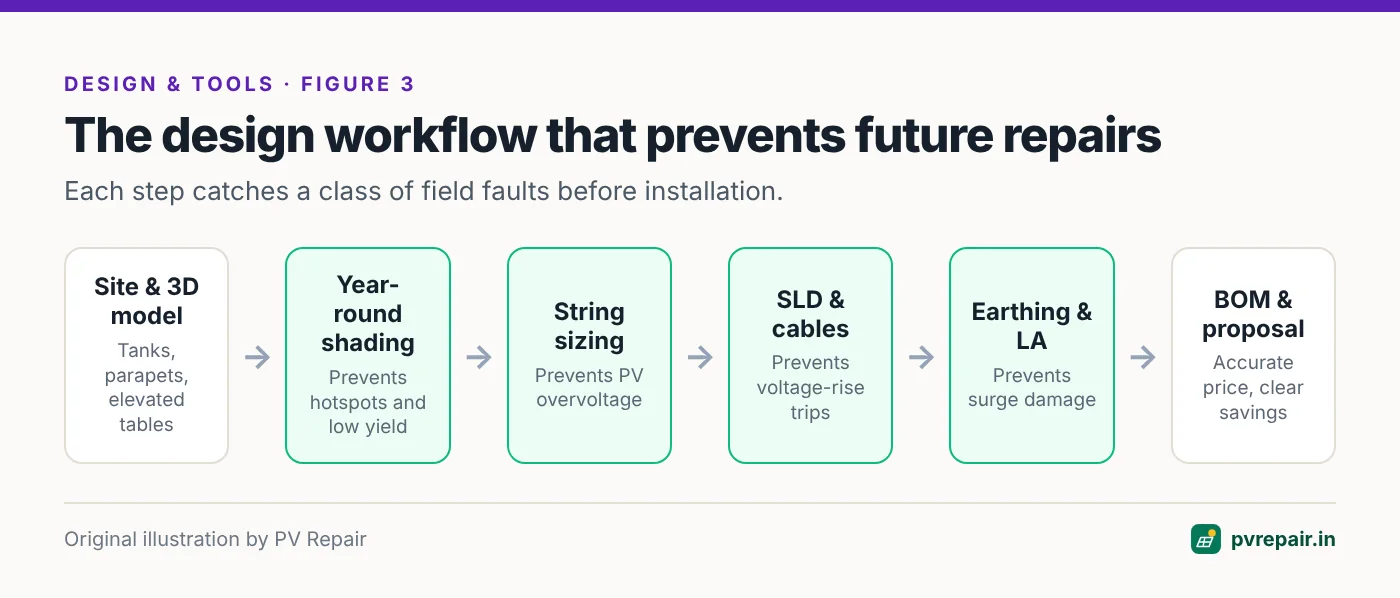
Whichever tool you choose, build these checks into every design — they map directly to the most common faults we see in the field:
- Shading analysis across the whole year — prevents hotspots, excessive bypass diode operation and disappointing generation.
- String sizing against record low temperatures and hot-day MPPT limits — prevents PV overvoltage and MPPT drop-out.
- Cable sizing for voltage drop and rise, not just current — prevents grid overvoltage trips.
- Inverter placement with shade and clearances — prevents overheating and derating.
- Earthing, SPD and lightning arrester layout designed, not improvised — prevents surge damage and isolation faults.
- Cable routing in protected trays and conduit — prevents rodent damage and arc faults.
Tools that produce an SLD, an earthing and LA layout, structure drawings and a cable routing schedule directly from the 3D design — as both SolarDraft and Solar Designer do — make it much easier to get all of this right on every project, not just the big ones.
How to choose: a practical checklist
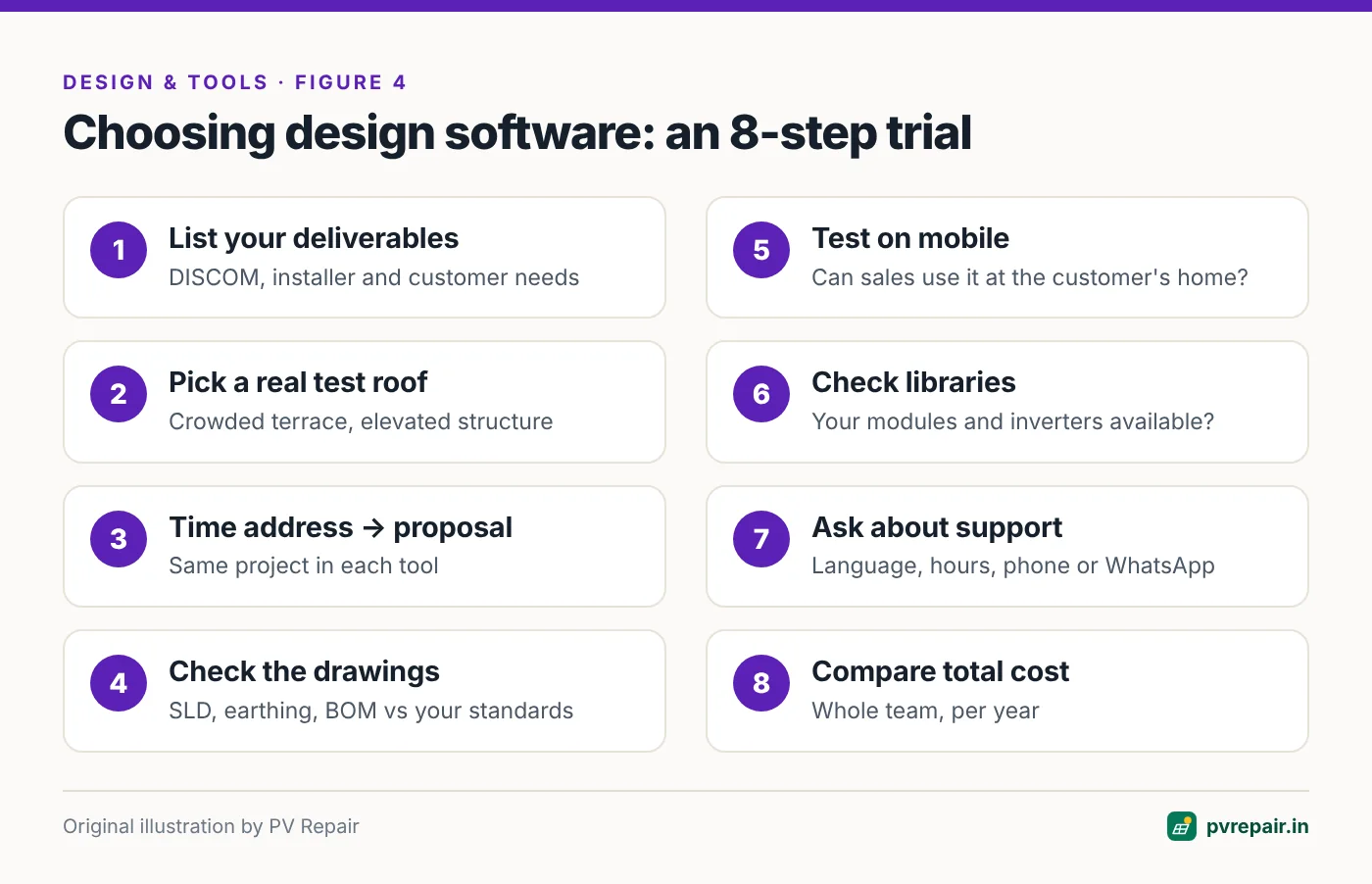
- List your deliverables. What does your DISCOM need? What do your installers need on site? What do customers expect in a proposal?
- Pick a real test roof. Choose a recent, complicated project — tanks, parapets, an elevated structure.
- Time it. Measure how long each tool takes from address to proposal and drawing set.
- Check the outputs. Compare SLDs, earthing layouts and BOMs with what your engineers produce today.
- Test on mobile. Can your sales team use it at the customer's home?
- Check libraries. Are the modules and inverters you buy available, and how quickly are missing ones added?
- Ask about support. Is help available in your language and working hours, by phone or WhatsApp?
- Compare total cost. Annual cost for your whole team, not just a single licence.
Frequently Asked Questions
What is the best solar design software in India?
For Indian solar EPCs, we rank SolarDraft first for its combination of fast browser-based 3D design, year-round shading heatmaps, PM Surya Ghar subsidy-aware proposals, DISCOM-ready drawings and Indian language support. Solar Designer is a close second, with an especially complete technical drawing pack and BOM workflow.
Is there free solar design software?
Yes. OpenSolar is free to use, and some inverter manufacturers offer free design tools for their own equipment. Commercial tools such as SolarDraft offer free trials, which are worth using on a real project before committing.
Do I need PVsyst if I use 3D design software?
For residential and most small commercial rooftops, a good 3D design tool with shading and energy estimates is usually enough. For larger projects that need bankable energy yield reports for lenders or investors, PVsyst is still the common standard and is often used alongside a design and proposal tool.
Can solar design software create DISCOM documents?
Some can. SolarDraft and Solar Designer both produce drawings such as single-line diagrams and site/key plans intended for DISCOM applications. Always confirm the formats your specific DISCOM requires.
Can I design solar systems on a mobile phone?
Browser-based tools such as SolarDraft and Solar Designer run on mobile devices, which lets sales teams create and present 3D designs during the customer visit.
How does design software reduce solar repair and maintenance costs?
By catching problems before installation: shading that causes hotspots, strings that exceed inverter voltage limits in winter, undersized cables that cause voltage trips, and poorly planned earthing and cable routes. Every fault avoided at design stage is a service visit you never have to make.
Related guides
Annual Solar PV Maintenance Checklist for Homes and Commercial Rooftops
A complete, practical annual maintenance checklist for rooftop solar in India — visual inspection, modules, structure, DC and AC wiring, inverters, earthing, batteries, monitoring and documentation — with what owners can do and what needs a technician.
Solar System Producing Less Power Than Expected? A 10-Step Diagnosis
How much should your rooftop solar system really generate in India, and how to find out why it's producing less — from weather and soiling to shading, inverter clipping, string faults, degradation and monitoring errors.

Rodent, Monkey and Bird Damage to Solar Cables: Prevention and Repair
How rats, squirrels, monkeys and pigeons damage rooftop solar systems in India, the faults they cause, and proven prevention methods — conduit, cable trays, mesh skirts and bird deterrents — plus safe repair of chewed cables.