Solar Inverter Overheating and Power Derating: Causes, Diagnosis and Fixes
Why solar inverters reduce output or shut down on hot afternoons, how to tell normal thermal derating from a real fault, and practical fixes for ventilation, mounting and fan failures.
On a clear April afternoon in most of India, your rooftop should be producing close to its peak. Yet many owners notice that the generation curve on their monitoring app flattens or dips right when the sun is strongest. Sometimes the inverter shows Over Temperature, Temp High, Derating or Power Limit (Temp). In extreme cases it shuts down entirely until it cools.
This is thermal derating, and it's one of the most underestimated sources of lost energy in hot climates. The good news is that it's almost always caused by installation choices that can be corrected. This guide explains how derating works, how to recognise it in your data, and what to change.
Quick answer
Inverters reduce their output power when internal temperatures approach safe limits, protecting the power electronics. Derating that starts at moderate ambient temperatures is usually caused by direct sun on the inverter, poor ventilation, insufficient clearance, clogged heat sinks or failed cooling fans. Shading the inverter, restoring clearances, cleaning heat sinks and replacing fans typically recovers most of the lost output.
How thermal derating works
An inverter converts DC to AC at around 96–98.5% efficiency. That sounds high, but the remaining 1.5–4% is turned into heat inside the box. A 10 kW inverter at full power may be dissipating 200–300 W continuously — like a small heater that has to be cooled by a heat sink and, often, fans.
The semiconductors (IGBTs or MOSFETs), capacitors and magnetics inside have maximum operating temperatures. To protect them, the inverter monitors several internal temperature sensors. When a sensor approaches its limit, the control software gradually reduces output current. If temperatures keep rising, it reduces further or shuts down.
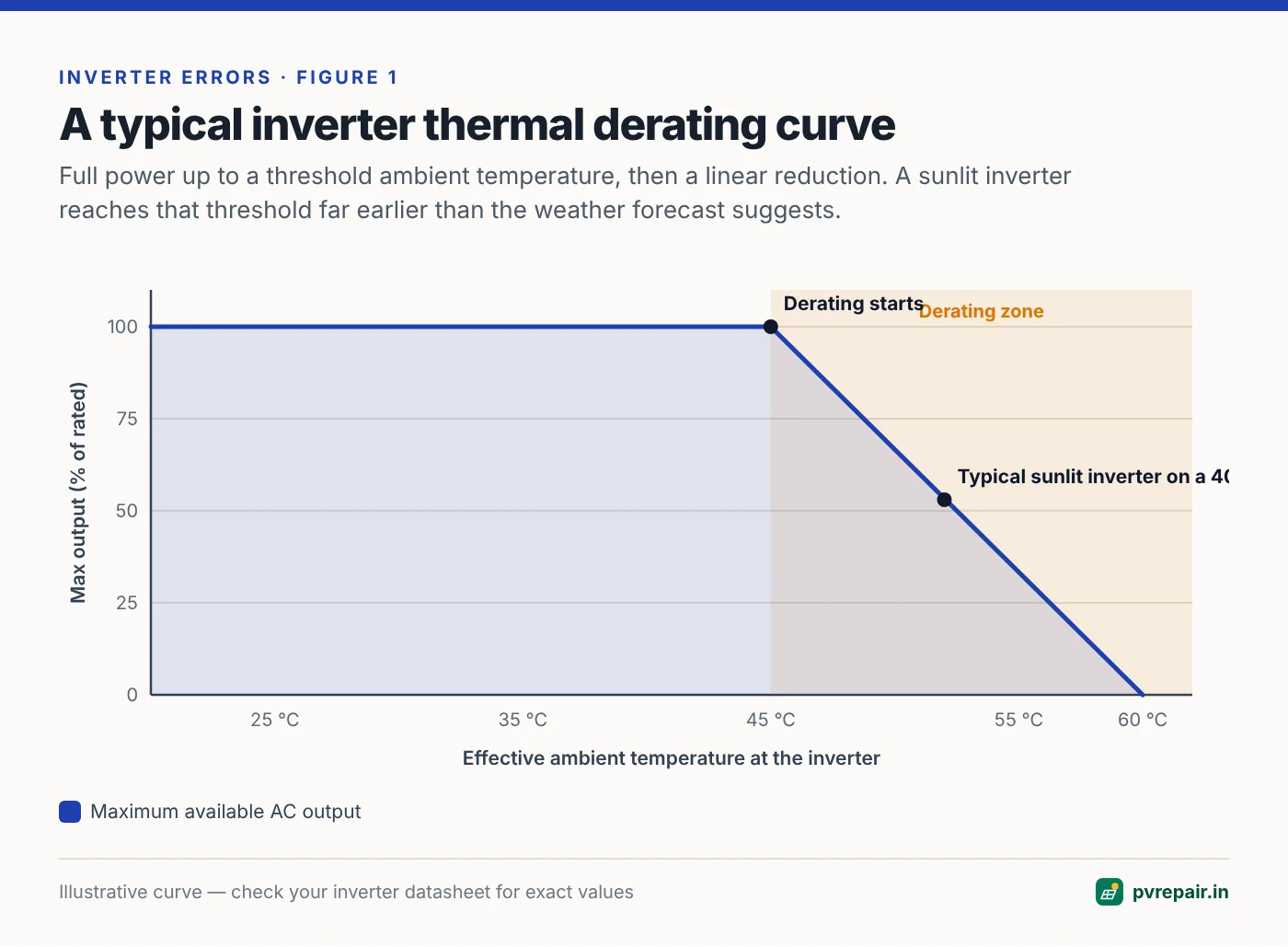
Every inverter datasheet includes a derating curve that shows maximum output power against ambient temperature. Typically, full power is available up to an ambient temperature somewhere around 40–50 °C, after which output falls in a straight line towards zero at the upper operating limit, often around 60 °C.
Why "ambient" is misleading on a rooftop
Datasheet ambient temperatures are measured in shade with free air movement. A grey inverter bolted to a south-west facing wall in direct sun, with a hot terrace below it, can easily see an effective ambient 10–20 °C above the weather forecast. On a 40 °C day, that inverter is effectively working at 50–60 °C — deep into its derating range.
This is why two identical inverters on the same street can behave completely differently. One sits in a shaded, ventilated stairwell; the other is in full afternoon sun in an enclosed metal cabinet.
Recognising derating in your monitoring data
Derating has a distinctive signature:
- A flat top or a dip in the early afternoon on clear days, often between 12:30 and 3:30 p.m. when the inverter's side of the building receives the strongest sun.
- Inverter internal temperature (if logged) rising to a plateau.
- No grid or isolation alarms — just reduced power, perhaps with a Derating or Temperature event.
- Worse in April–June and better in the monsoon and winter.
Compare this with clipping, which is also a flat top but at exactly the inverter's rated AC power. Clipping happens when the array is larger than the inverter (a high DC/AC ratio) and is a normal, designed-for loss. Derating flattens the curve below rated power, and the level drops as the day heats up.
A quick test
On a hot, clear day, temporarily shade the inverter with a board or umbrella placed well clear of its vents. If output recovers within 15–30 minutes, sun exposure is a major contributor. This doesn't fix anything, but it's strong evidence.
Common causes
1. Direct sunlight on the inverter
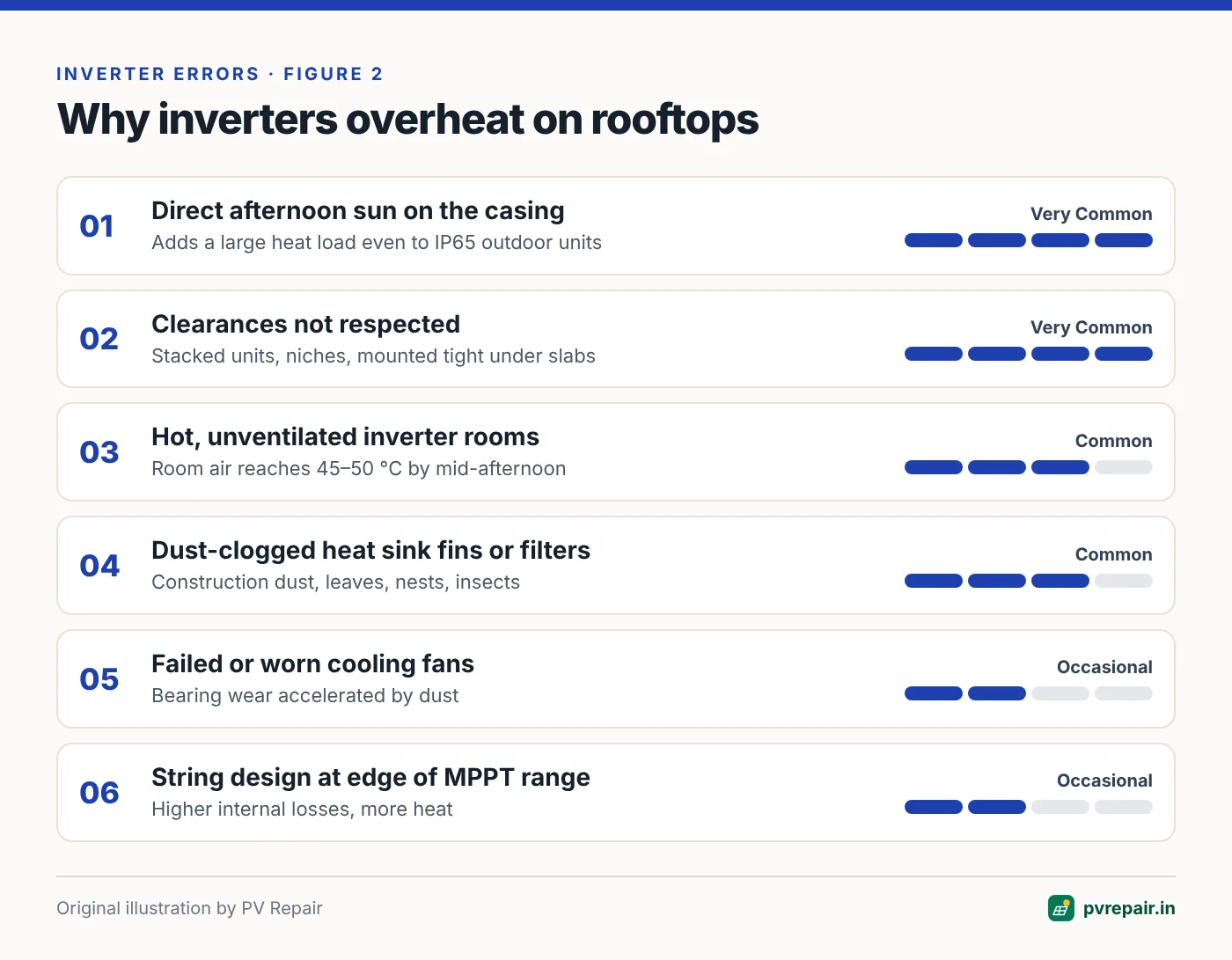
Solar radiation on the casing adds a large heat load. Many manufacturers recommend or require shading, even for IP65 outdoor-rated models. Outdoor rating means the unit survives rain and dust; it doesn't mean it performs at full power in direct sun.
2. Insufficient clearances
Manuals specify minimum distances above, below and to the sides of the inverter, and between multiple inverters. These ensure hot air can rise away from the heat sink and cool air can enter. Common mistakes include mounting two inverters one directly above the other, so the upper one breathes the lower one's exhaust; installing in a narrow niche or cupboard; and mounting just under a slab or ceiling with no space for hot air to escape.
3. Enclosed or poorly ventilated rooms
An inverter room or electrical cabinet without ventilation slowly heats up through the day. By mid-afternoon the room air may be 45–50 °C. Inverters in small, closed utility rooms are a classic cause of chronic summer derating.
4. Dust-clogged heat sinks and filters
Fins on the heat sink trap dust, leaves, bird nests and insect nests. In dusty regions and near construction or industrial zones, a heat sink can lose a big part of its cooling ability within a year. Some inverters also have air filters that clog.
5. Failed cooling fans
Many inverters above roughly 5–8 kW use fans. Fans are mechanical parts with a finite life, and dust accelerates bearing wear. A failed fan may trigger a Fan Fault alarm — or it may simply cause the inverter to run hotter and derate earlier. Listen for fans running at high power, and check that they spin freely.
6. High DC voltage or poor string design
Inverter losses vary with input voltage. Strings designed near the bottom or top of the MPPT range can increase internal losses and heating. Very high DC/AC ratios keep the inverter at full power for many hours, raising average temperatures. This is a design consideration rather than a fault, but it affects thermal behaviour. Good design software helps model this at the planning stage — see our overview of 3D solar design software for EPCs.
How to diagnose step by step
- Pull a week of data from your monitoring platform, including inverter internal temperature if available. Look for the flat-top pattern on clear days.
- Read the event log for Over Temperature, Derating, Fan Fault or similar events and note their times.
- Visit the inverter at 2 p.m. on a hot day. Is it in direct sun? Feel the air around it (carefully — heat sinks can exceed 70 °C). Are the fans running?
- Measure the actual air temperature near the inverter intake with a thermometer. Compare it with the datasheet derating start temperature.
- Check clearances against the installation manual with a tape measure.
- Inspect the heat sink and fans with the inverter isolated. Look for dust, nests and blocked fins. Check that fans spin freely by hand.
- Compare with similar systems nearby or with your own winter data to estimate how much energy is being lost.
Fixes that work
Shade the inverter
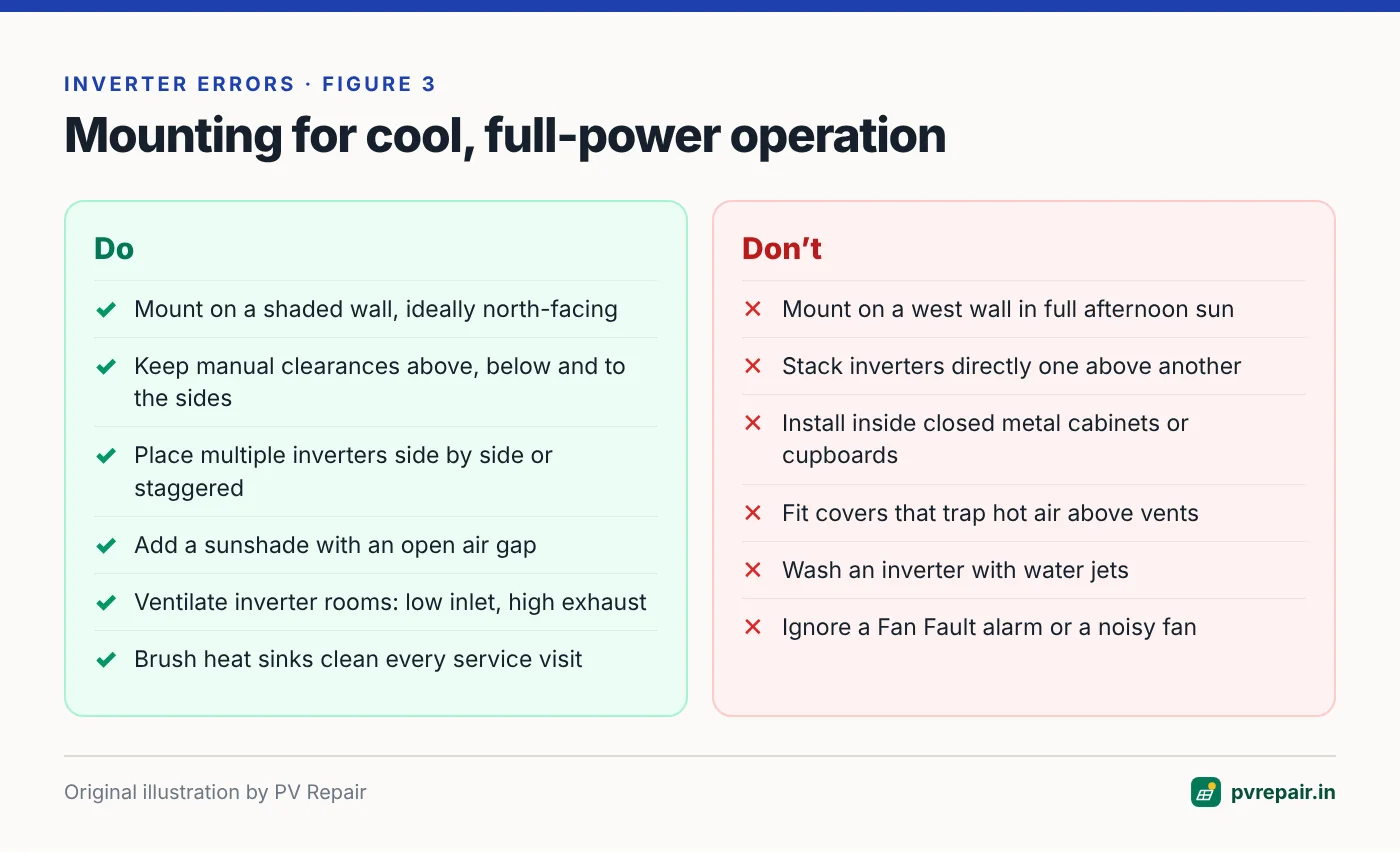
A simple sunshade or canopy made of sheet metal or polycarbonate, mounted with an air gap above and in front of the inverter, can lower casing temperatures significantly. Make sure it doesn't restrict airflow or trap hot air — the shade should be open on the sides and well above the top vents. Some manufacturers sell approved sun covers.
Relocate the inverter
If the inverter is in a hot spot — a west wall, a sunlit terrace, an unventilated cabinet — moving it to a shaded, ventilated north-facing wall or an open stairwell can make a big difference. Relocation means extending DC and AC cables, so consider voltage drop and use the opportunity to upgrade the AC cable if needed.
Restore clearances and stagger multiple units
Mount multiple inverters side by side with the specified spacing, or stagger them diagonally, rather than stacking them vertically. If you must stack, add a deflector plate to divert the lower unit's exhaust away from the upper unit's intake.
Ventilate inverter rooms
For indoor installations, provide a low-level fresh air inlet and a high-level exhaust, ideally with a thermostatically controlled exhaust fan. As a rule of thumb, calculate the total heat dissipated by all inverters at full power and size the ventilation to remove it with only a small temperature rise.
Clean heat sinks and replace fans
With the inverter isolated and cooled, use a soft brush and low-pressure compressed air to clear heat sink fins. Never use water jets on an inverter. Replace worn or noisy fans with genuine spare parts — many inverters have fan assemblies designed for field replacement.
Isolate before cleaning
Switch off AC and DC isolators and wait the discharge time specified on the inverter label (often 5 minutes or more) before touching heat sinks or fan assemblies. Internal capacitors hold dangerous charge after shutdown.
Review the design
On commercial sites with chronic derating, it may be worth reviewing string voltages, DC/AC ratio and inverter selection. Sometimes a larger inverter model, or one with a higher temperature rating, is the right long-term answer.
How much energy are you losing?
A rough estimate: compare your peak-hour output on hot clear days with a similar clear day in a cooler month, adjusting for the fact that panels themselves lose around 0.3–0.4% of power per °C of cell temperature. If the inverter's output is flat well below its rating while the array should be producing more, the difference is your derating loss. On badly sited inverters this can reach several percent of annual generation, concentrated in the sunniest months.
Frequently Asked Questions
Is it normal for my solar inverter to get hot?
Yes. Heat sinks commonly reach 50–70 °C on a sunny day, which is normal. The concern is when the inverter reduces power or reports temperature alarms at moderate ambient temperatures.
Does inverter derating damage the inverter?
No, derating is a protective function that prevents damage. However, consistently high operating temperatures shorten the life of capacitors and other components, so reducing heat improves long-term reliability as well as generation.
Can I install my inverter in direct sunlight if it's IP65 rated?
IP65 refers to protection against dust and water jets, not heat. Many manufacturers recommend shading outdoor inverters. Check your installation manual — some warranties may be affected by installation in direct sun.
What's the difference between clipping and derating?
Clipping limits output at exactly the inverter's rated power because the array can produce more than the inverter can convert — it's an expected design trade-off. Derating limits output below rated power because of temperature, and should be investigated.
How often should inverter fans be replaced?
There's no universal interval. It depends on the fan, operating hours and dust levels. Check fans during your annual maintenance and replace any that are noisy, slow or stalled.
Related guides
PV Overvoltage Error: When String Voltage Exceeds Your Inverter's Limit
Why PV overvoltage alarms appear on cold, bright mornings, how to calculate maximum string voltage with temperature correction, and how to fix an oversized string before it damages the inverter.
How to Read Solar Inverter Fault Codes: A Universal Guide for Any Brand
Inverter error codes look cryptic, but almost every brand groups them into the same handful of categories. Learn to decode any fault code, use the event log, and decide what you can check yourself.
Solar Inverter Not Turning On? A Systematic Diagnosis From Panels to Display
Blank screen, no LEDs or stuck on "Waiting"? Work through the DC supply, start-up voltage, isolators, fuses and internal faults in the right order to find why your solar inverter won't start.