Burnt Junction Box on a Solar Panel: Causes, Risks and Safe Repair Options
Why solar panel junction boxes overheat, melt and burn, how to spot the early warning signs, what to do immediately when you find one, and whether a junction box can be repaired or the module must be replaced.
The junction box (J-box) on the back of a solar module is where the cell ribbons leave the laminate and connect to the output cables and bypass diodes. It's a small plastic enclosure, but it carries the full string current and, because it sits on the hot underside of a module, it runs warm. When something goes wrong inside it — a poor connection, a failing diode, water ingress — it can overheat to the point of melting, charring and, in rare cases, starting a fire.
Burnt junction boxes are among the most serious defects you can find on a rooftop. This guide explains why they happen, how to recognise early signs, what to do immediately, and what the realistic repair options are.
Quick answer
Junction boxes burn because of high resistance at a connection (poor soldering, loose clamps, corroded contacts), overheated bypass diodes, or moisture causing tracking and arcing. Warning signs include brown or black discolouration, a warped lid, a burning smell, a hot spot on a thermal image or a backsheet scorch mark. Isolate the string safely and replace the module; junction box repair is only appropriate in limited cases and should follow the manufacturer's guidance.
What's inside a junction box
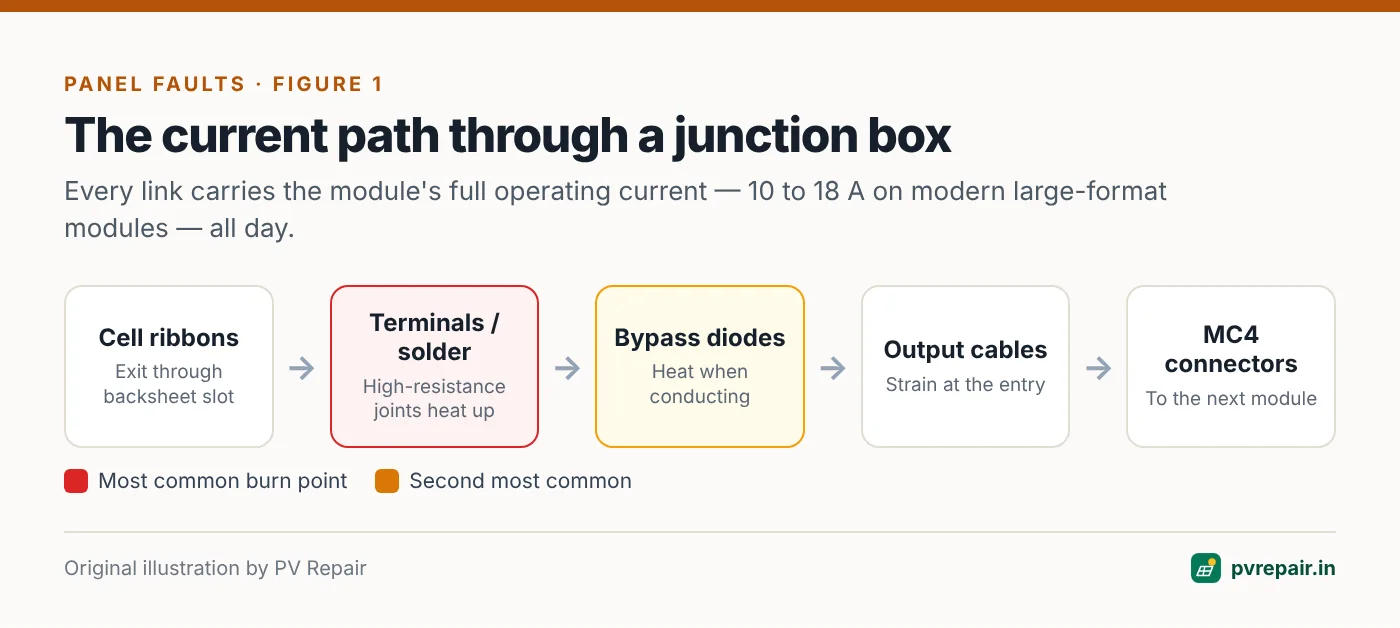
A typical junction box contains:
- Busbar ribbons coming out of the laminate through a slot in the backsheet.
- Terminals or solder points where these ribbons connect to the box's internal conductors.
- Bypass diodes (usually three), one per substring.
- Output cables with MC4-type connectors.
- Sealing: adhesive bonding the box to the backsheet, and often potting compound filling the box.
On many modern modules, especially half-cut designs, the single box has been replaced by three small "split" junction boxes, each containing one diode.
Every one of these connections carries the module's full operating current — 10–18 A on modern large-format modules — continuously during daylight hours.
Why junction boxes burn
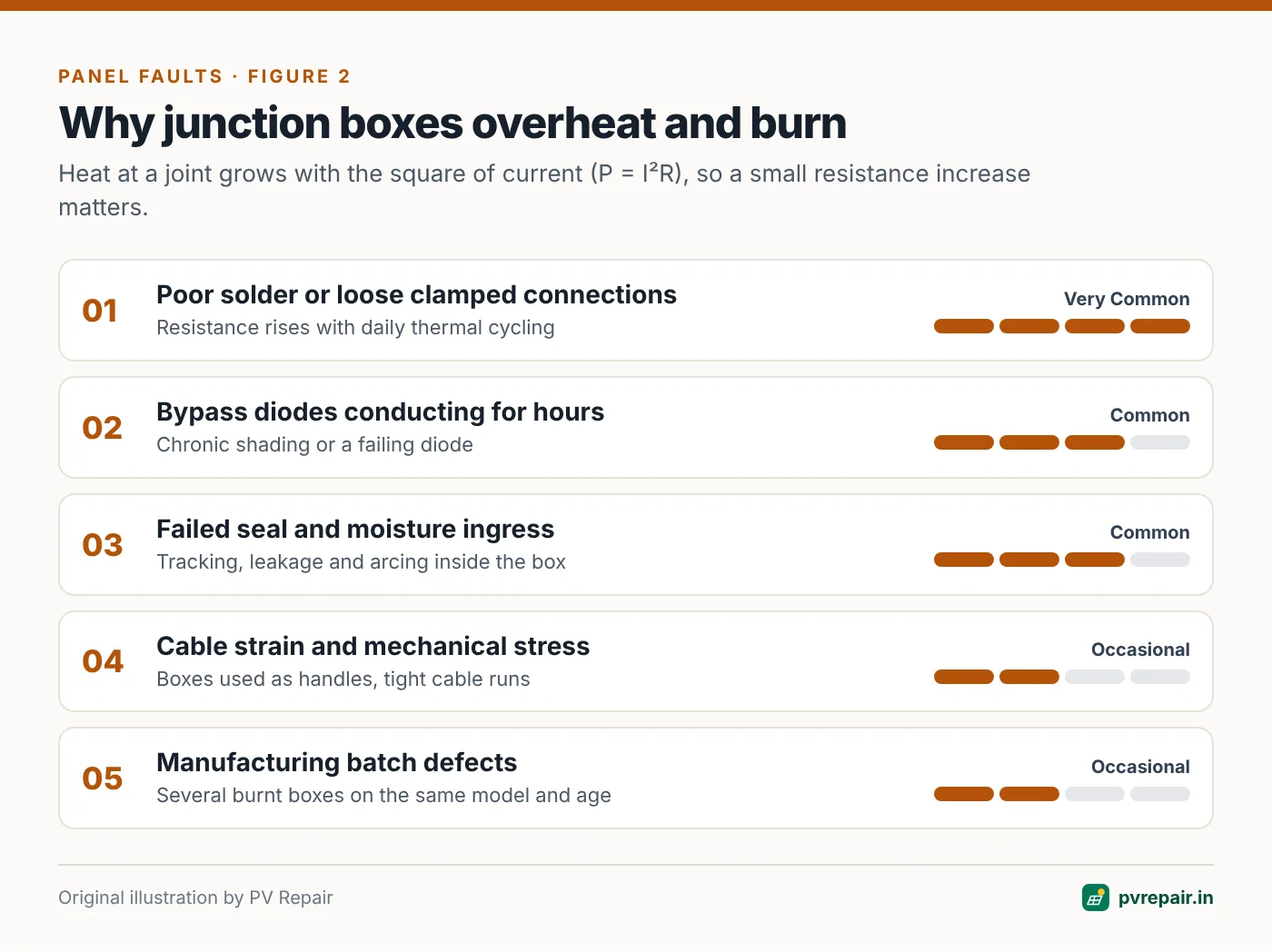
High-resistance connections
Heat at a connection is proportional to the square of the current multiplied by the resistance (P = I²R). A good joint has a tiny resistance and generates negligible heat. A poor joint — a cold solder joint, a ribbon that's only partly clamped, a corroded contact — might have several times the resistance. At 14 A, even a fraction of an ohm produces significant heat in a tiny, enclosed space.
Thermal cycling makes it worse. Every day the joint heats up and cools down. Over months, a marginal joint loosens further, resistance rises, and the heating accelerates until the plastic softens and chars.
Diode overheating
Bypass diodes dissipate heat whenever they conduct. In a module that's shaded for several hours a day, the diodes may conduct for long periods. If the junction box isn't designed to shed that heat — or if the diode is near its rating — the diode and surrounding plastic overheat. A failing diode can also heat up. See our guide to bypass diode failures.
Moisture and tracking
If the junction box seal fails, moisture gets in. Water and contamination on surfaces between conductors at different voltages can create conductive tracks, leading to leakage current and arcing. This is also a common cause of isolation and residual current faults.
Mechanical stress
Cables pulled tight, modules flexed during installation, or junction boxes used as handles can stress internal connections and break the adhesive seal. Cable strain at the box entry is a common contributor.
Manufacturing batch defects
Some module batches have had known junction box problems — insufficient solder, poor potting, inadequate adhesive. If you see multiple burnt boxes on modules of the same model and age, suspect a batch issue and contact the manufacturer.
Warning signs
Catching a junction box problem early prevents fire damage and makes warranty claims easier. Look for:
- Discolouration: yellowing, browning or blackening of the box, lid or cables.
- Deformation: a warped, bulging or melted lid.
- Backsheet scorch marks or brown discolouration around the box, often visible as a brown patch on the front of the module behind the box location.
- A burning or acrid smell near the array.
- Thermal imaging showing the junction box much hotter than other boxes in similar modules.
- Electrical symptoms: low string current or voltage, intermittent string dropouts, insulation or arc faults.
Look from the front too
On many modules, a severely overheating junction box causes a visible brown or dark patch on the front of the module, directly in front of the box location. If you see this from the ground or the edge of the roof, the box behind it needs urgent inspection.
What to do when you find a burnt junction box
Treat it as a fire hazard
A burnt junction box can be live, can have exposed conductors, and can re-ignite. Do not touch the box or the cables with bare hands. Do not pull connectors under load — DC arcs can sustain and cause burns.
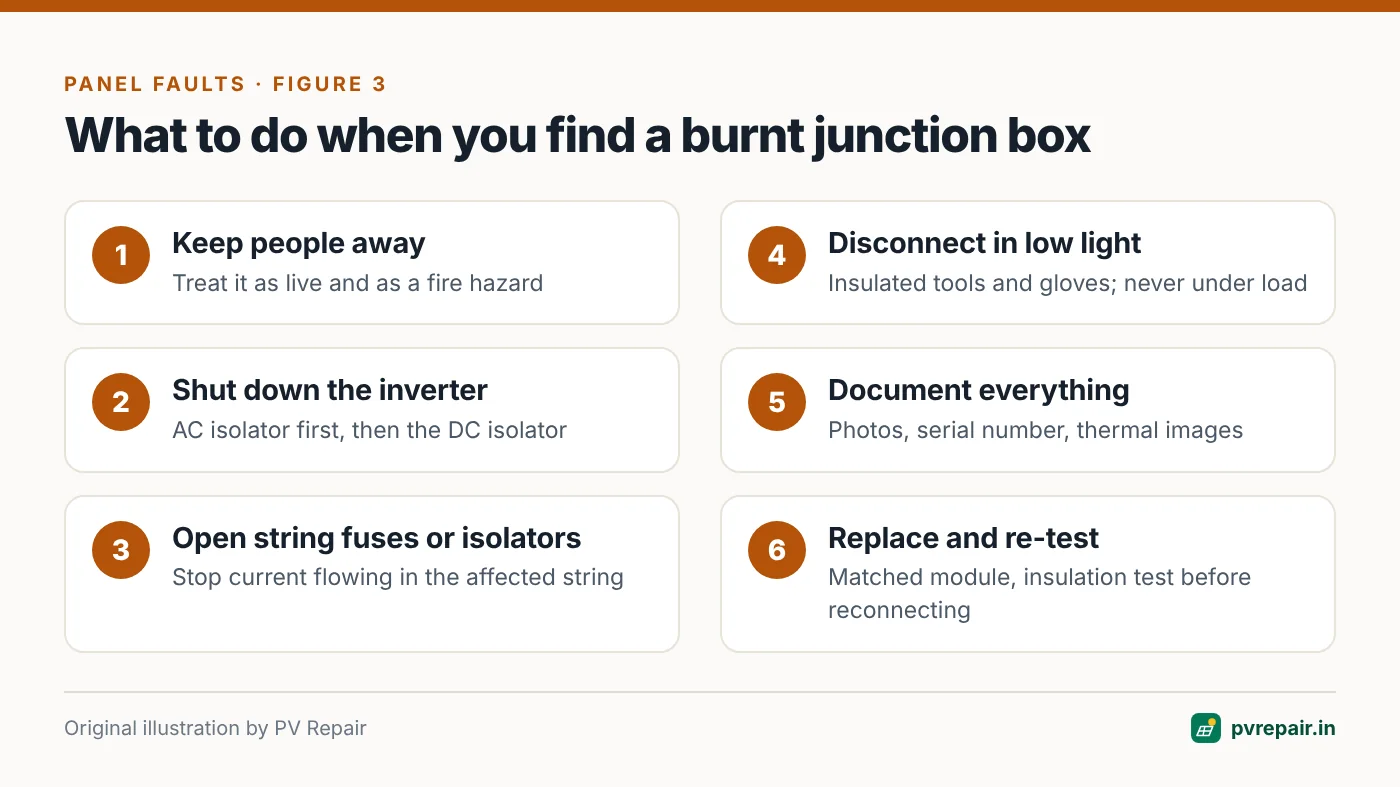
- Keep people away from the affected area.
- Switch off the inverter (AC isolator first, then the DC isolator) so that no current is flowing in the string. The modules will still have voltage in daylight.
- Open string fuses or isolators for the affected string if available.
- Wait for low light (early morning, evening, or cover the module with an opaque sheet) before disconnecting the affected module, using insulated tools and gloves.
- Photograph everything: the box, the module front and back, the label and serial number, and any thermal images.
- Inspect neighbouring modules of the same model and batch.
- Leave the string disconnected until the module is replaced and the string is tested.
Repair or replace?
Replacement is the default
For the vast majority of cases, the right action is to replace the module. A burnt junction box usually means:
- The backsheet near the box has been heat-damaged, compromising insulation.
- The ribbon connections inside the laminate may be damaged where they exit.
- The box's adhesive bond and seal are compromised.
None of these can be reliably restored in the field to the original safety standard. Replacement under warranty is the cleanest outcome; keep your evidence and the module serial number.
When a junction box repair may be possible
In limited cases — where damage is confined to a removable lid, a replaceable diode, or a detachable cable connection, and the backsheet is undamaged — some manufacturers or specialised repair services can replace the junction box or its components. This requires:
- Manufacturer approval (to avoid voiding the warranty) or an out-of-warranty module where the owner accepts the trade-off.
- Compatible replacement parts with equal or better current, voltage and temperature ratings.
- Correct re-soldering or clamping of ribbons, re-potting and re-sealing.
- Insulation testing of the repaired module afterwards.
For most owners, a replacement module is cheaper and safer than a repair.
Matching the replacement module
When replacing, match the electrical characteristics as closely as possible to the rest of the string — particularly the current at maximum power (Imp) and dimensions for the mounting system. A higher-current replacement module is fine; a lower-current one will limit the whole string. If the original model is discontinued, your installer can choose a compatible substitute and check that the string's voltage remains within inverter limits — see PV overvoltage.
Preventing junction box failures
- Buy modules from manufacturers with a solid quality record and request junction box specifications (IP rating, temperature rating, diode current rating).
- Avoid cable strain — leave a service loop and support cables so they don't pull on the box.
- Don't use junction boxes or cables as handles when carrying or positioning modules.
- Avoid chronic shading, which keeps diodes conducting for long periods.
- Thermal-scan the array at commissioning and periodically to find warm boxes before they burn.
- Inspect junction boxes during annual maintenance, especially on older modules or known problem models.
A simple junction box inspection routine
During each maintenance visit, with the system operating at good irradiance:
- Thermal-scan the rear of accessible modules, or the front for a quick comparison between modules. Note any box running significantly hotter than its neighbours.
- Visually inspect a sample of junction boxes from below or behind, looking for discolouration, warping, cracked lids or lifted adhesive.
- Check cable entry points for strain, cracks and UV damage.
- Record the module serial numbers of anything suspicious, with photos, and schedule replacement.
Frequently Asked Questions
Can a burnt junction box cause a fire?
Yes, in severe cases. The junction box carries full string current, and overheating can ignite surrounding plastic and the backsheet. That's why a burnt or discoloured junction box should be treated as urgent.
Is it safe to keep using a module with a slightly discoloured junction box?
Discolouration indicates the box has been running hot. It should be inspected by a qualified technician, thermally imaged under load, and usually replaced. Don't wait for it to get worse.
Will a burnt junction box show up as an inverter error?
Sometimes. It may cause isolation, residual current or arc fault errors, or simply lower string output. In many cases there's no error at all until the damage is advanced, which is why visual and thermal inspections matter.
Can I just replace the MC4 connectors on a burnt junction box?
Only if the damage is confined to the external cable and connector and the box itself is unaffected. If the box is discoloured or deformed, the problem is inside, and replacing the connectors won't fix it.
Is a burnt junction box covered by warranty?
If caused by a manufacturing defect such as poor soldering or inadequate sealing, it's typically covered by the product warranty. Damage from installation errors, cable strain or external causes may not be. Good documentation significantly improves your chances.
Related guides
Delamination, Backsheet Cracks and Broken Glass: Can a Damaged Solar Panel Be Repaired?
How to recognise delamination, backsheet cracking, chalking and broken glass on solar modules, why each one is a safety and performance risk, and which repair options are realistic versus when replacement is the only safe choice.
Potential Induced Degradation (PID) in Solar Panels: Detection, Recovery and Prevention
What PID is, why it affects modules near the negative end of a string in hot, humid climates, how to recognise the pattern in data and EL images, and how anti-PID devices and design choices can recover and prevent losses.

Microcracks and Snail Trails in Solar Panels: What They Mean for Performance and Warranty
How microcracks form in solar cells, why snail trails appear along them, how electroluminescence and thermal imaging reveal cracks, and when cracked modules need replacing or a warranty claim.